User Guide
The modern wainwright for your vehicle
Welcome to Wainwright
Wainwright is your all-in-one vehicle companion. Track fuel economy, log maintenance, store important documents, and never miss a renewal or service date again. Whether you manage one daily driver or a household of vehicles, Wainwright keeps everything organized in one place.
A wainwright is a craftsperson who builds and repairs wagons — the word comes from the Old English wægnwyrhta, combining wægn (wagon) and wyrhta (worker or maker). For centuries, the wainwright was the person a community trusted to keep their vehicles road-worthy, from selecting the right timber for wheel spokes to fitting iron tires and ensuring every joint held together under load. We named this app after that trade because the spirit is the same: helping you take care of your vehicle so it takes care of you.
Getting Started
Creating Your Account
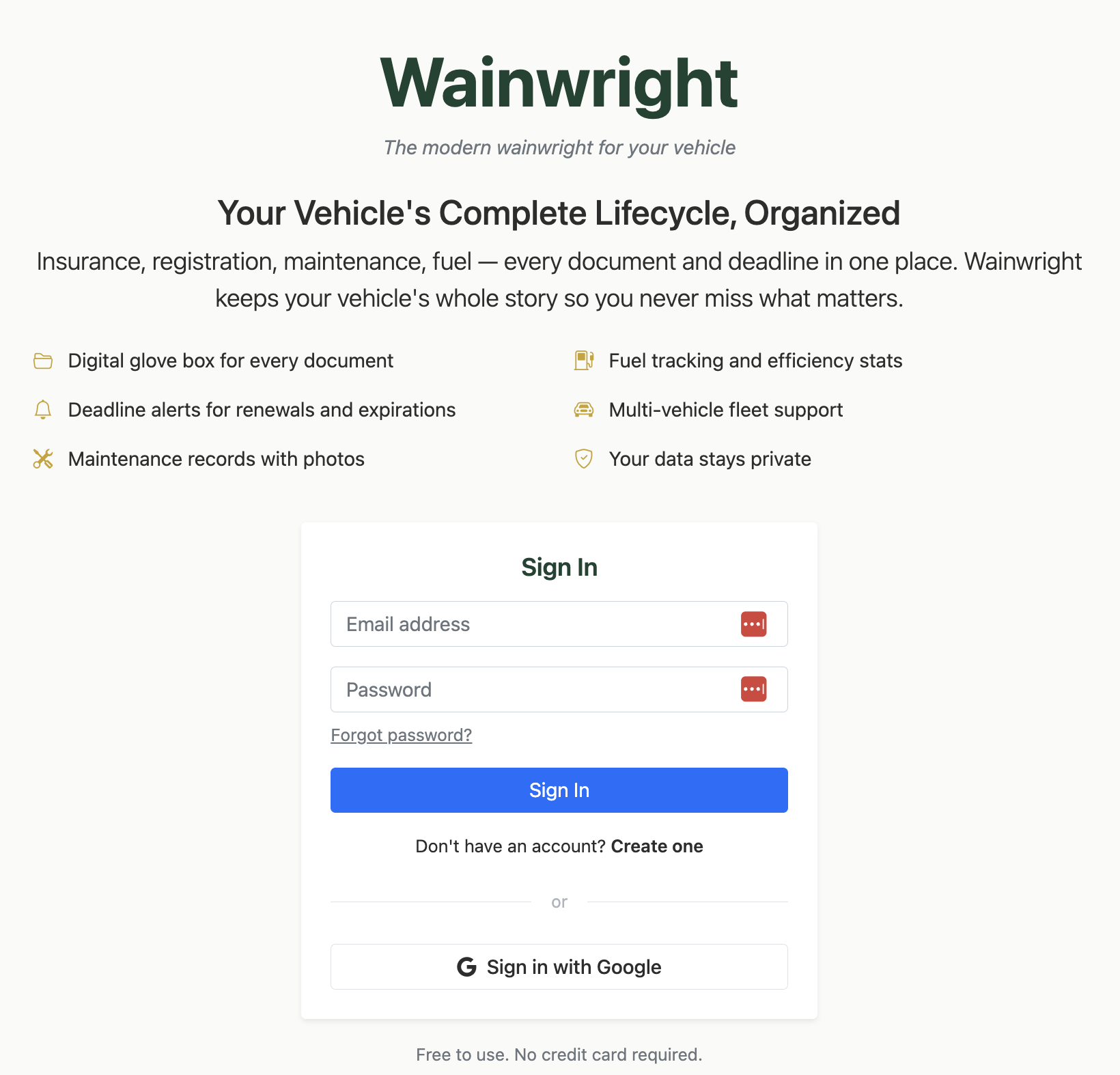
Wainwright offers two ways to sign in:
Google Sign-In — The fastest way to get started. Tap "Sign in with Google" and you're in.
Email & Password — Create an account with your email. You'll need to verify your email before accessing the app. Passwords must be at least 8 characters with uppercase, lowercase, and a number.
Setting Up Your Profile
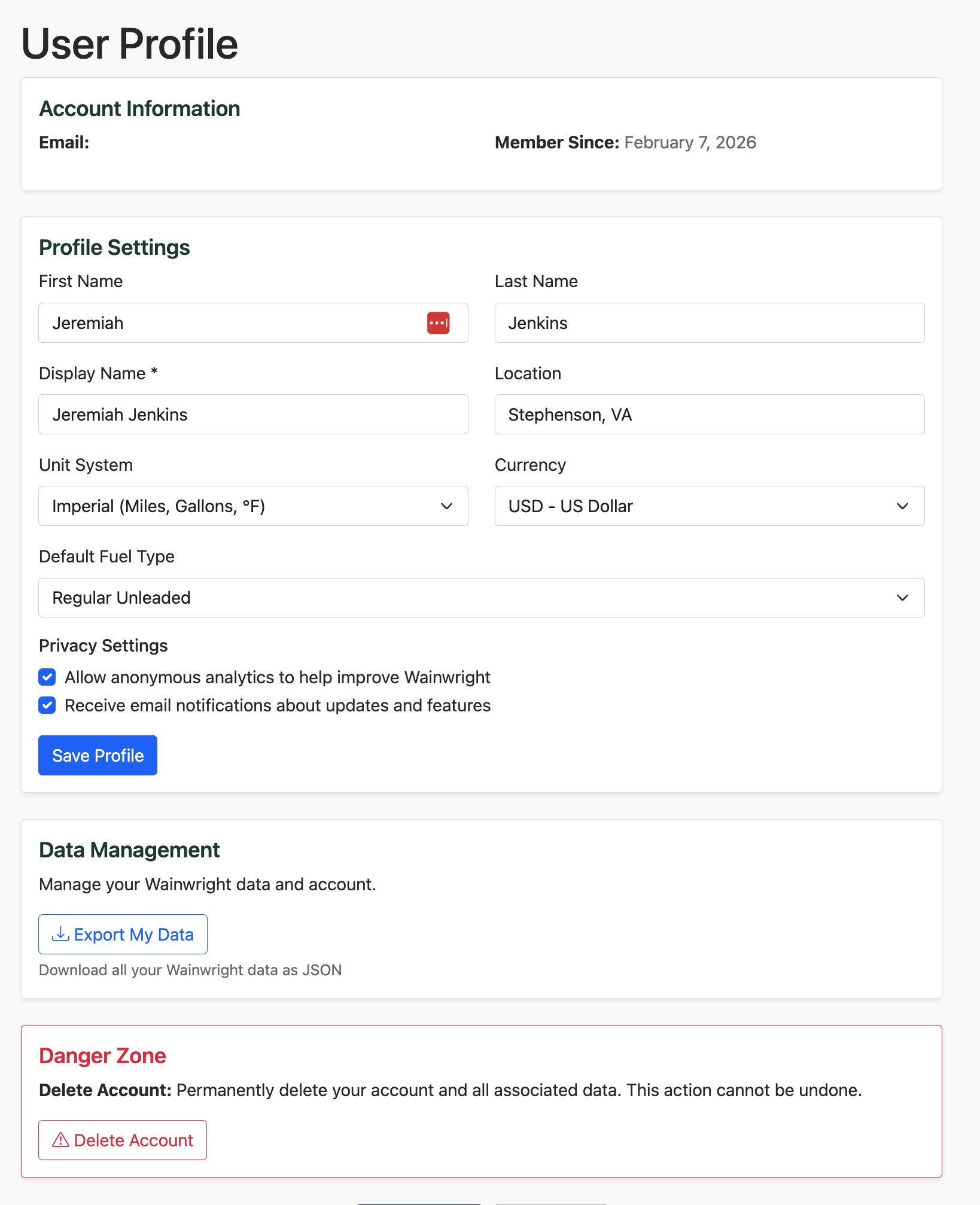
After your first login, you'll land on the Profile page. Take a moment to configure your preferences:
Units — Choose between Imperial (miles, gallons) or Metric (kilometers, liters). This changes every label, calculation, and form throughout the app.
Currency — Select your local currency (USD, CAD, EUR, or GBP). All cost fields and reports will format accordingly.
Default Fuel Type — Set your go-to fuel grade (Regular, Premium, Diesel, or E85).
Managing Your Vehicles
Your Fleet at a Glance
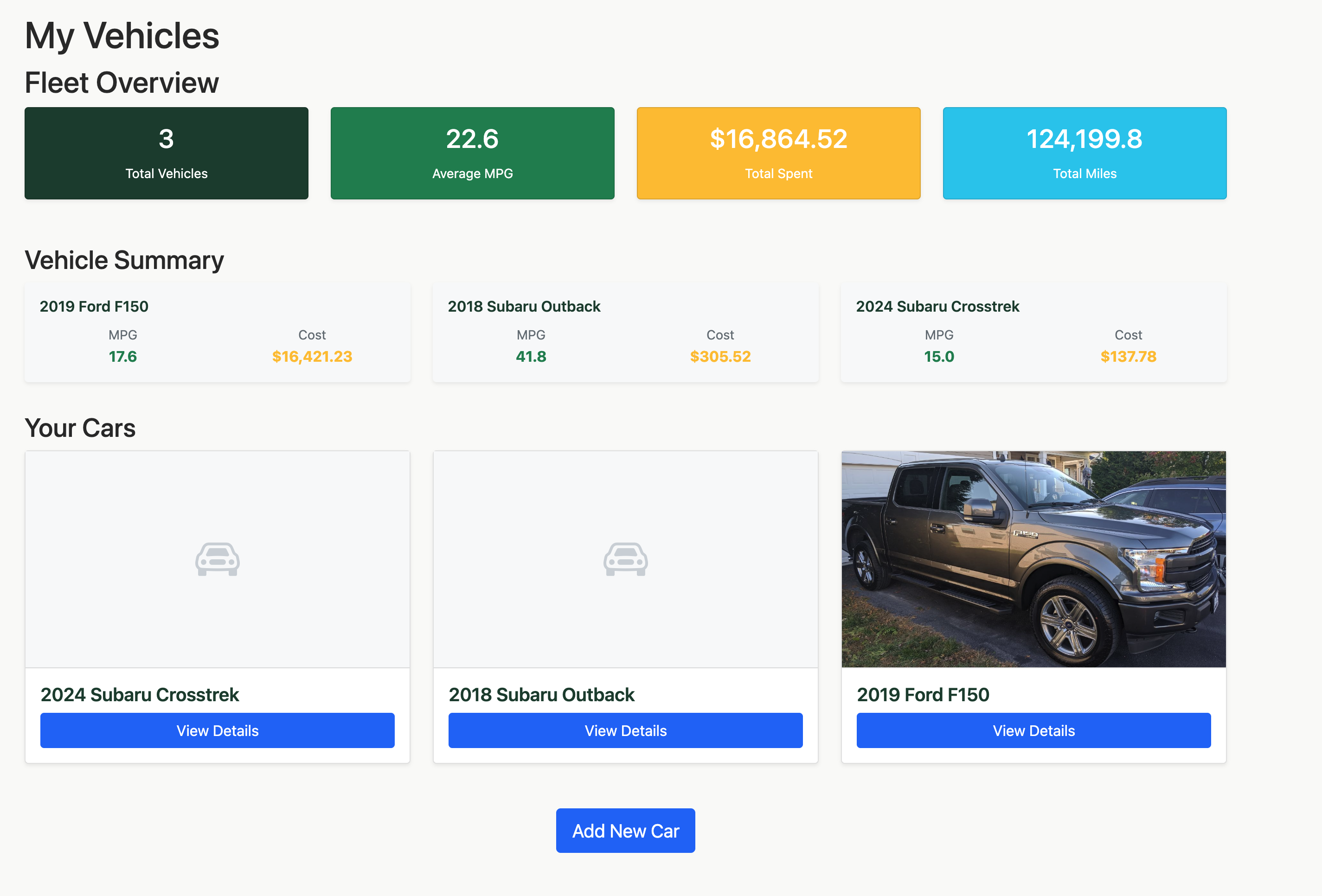
The My Vehicles page is your home base. Each vehicle gets its own card showing a quick snapshot of its stats, and the fleet overview gives you the big picture across all your vehicles:
- Total vehicles in your fleet
- Fleet average efficiency (weighted by mileage driven)
- Total spending across all vehicles
- Total miles driven across your fleet
Adding a Vehicle
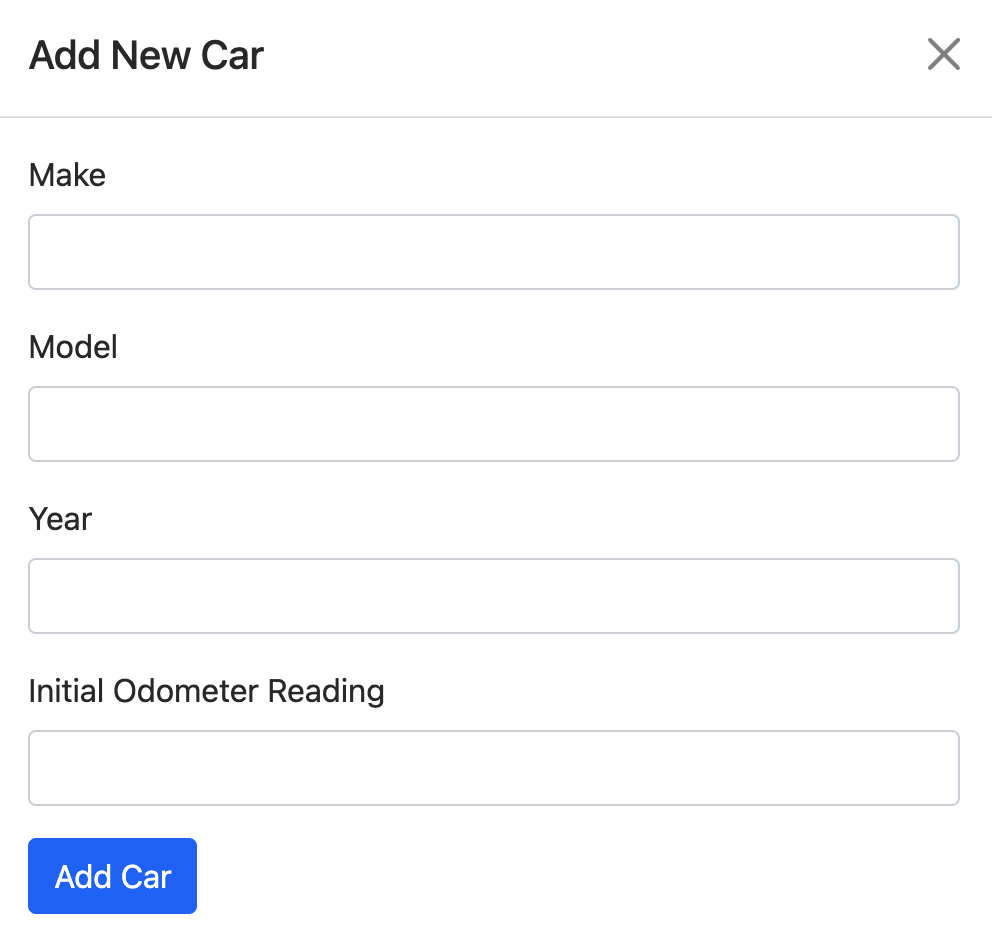
Tap the "Add Vehicle" button and enter your car's make, model, year, and current odometer reading. Wainwright creates your vehicle and records the starting odometer automatically — you're ready to start tracking immediately.
Personalizing Your Vehicle
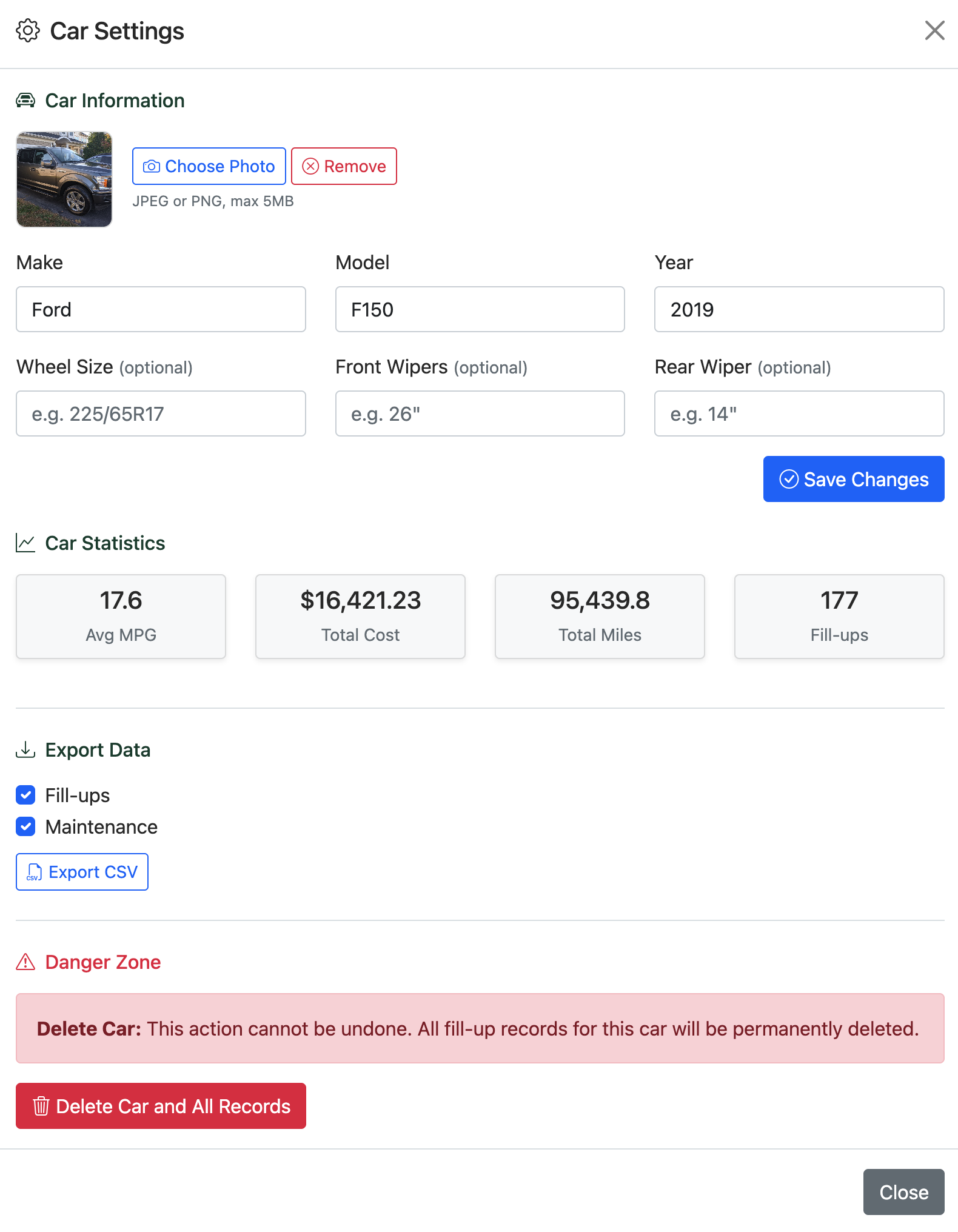
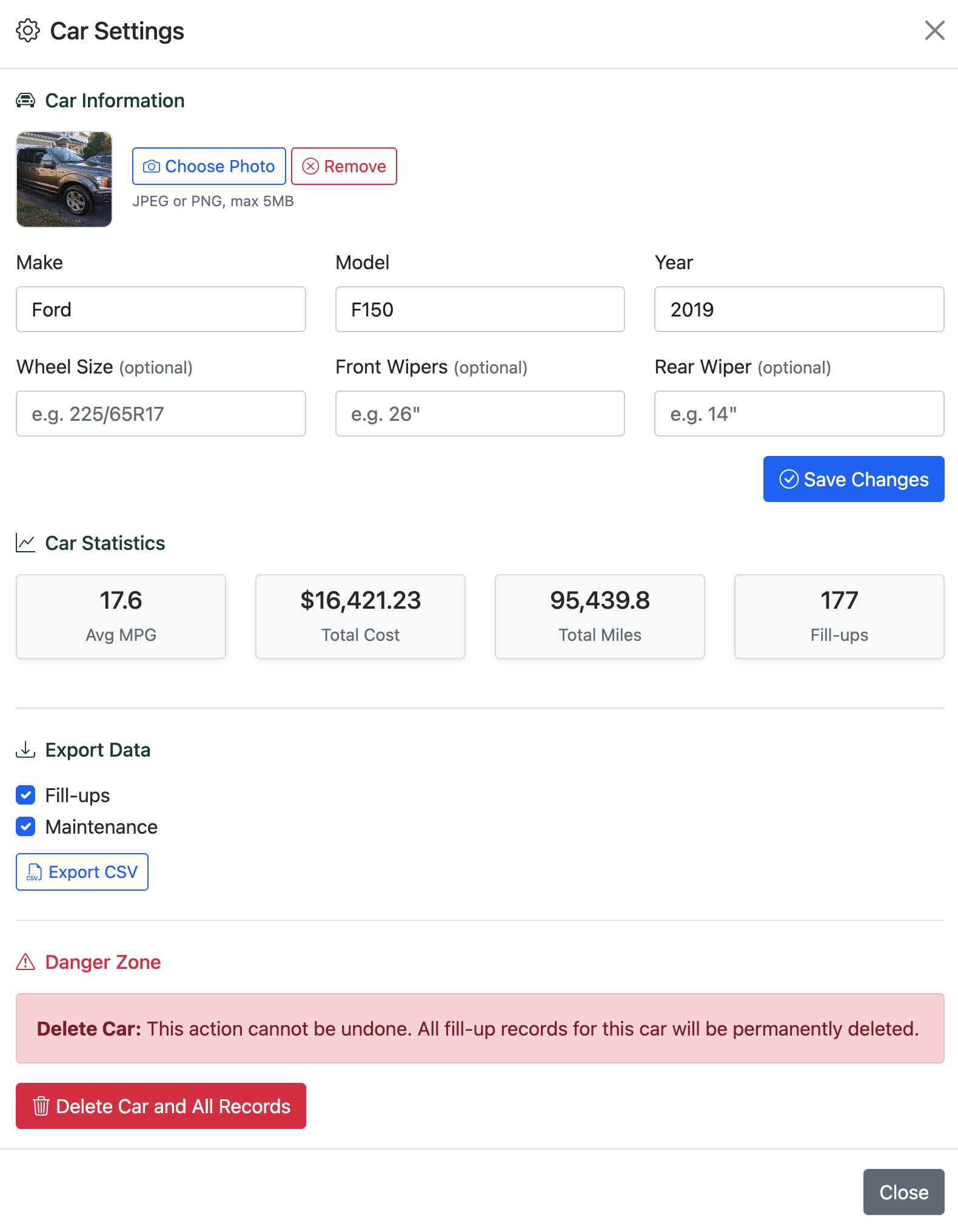
In Car Settings, you can upload a photo of your vehicle to make it easy to identify at a glance. You can also record vehicle specifications like wheel size and wiper blade sizes — handy details you always forget when you're standing in the auto parts aisle.
The Dashboard
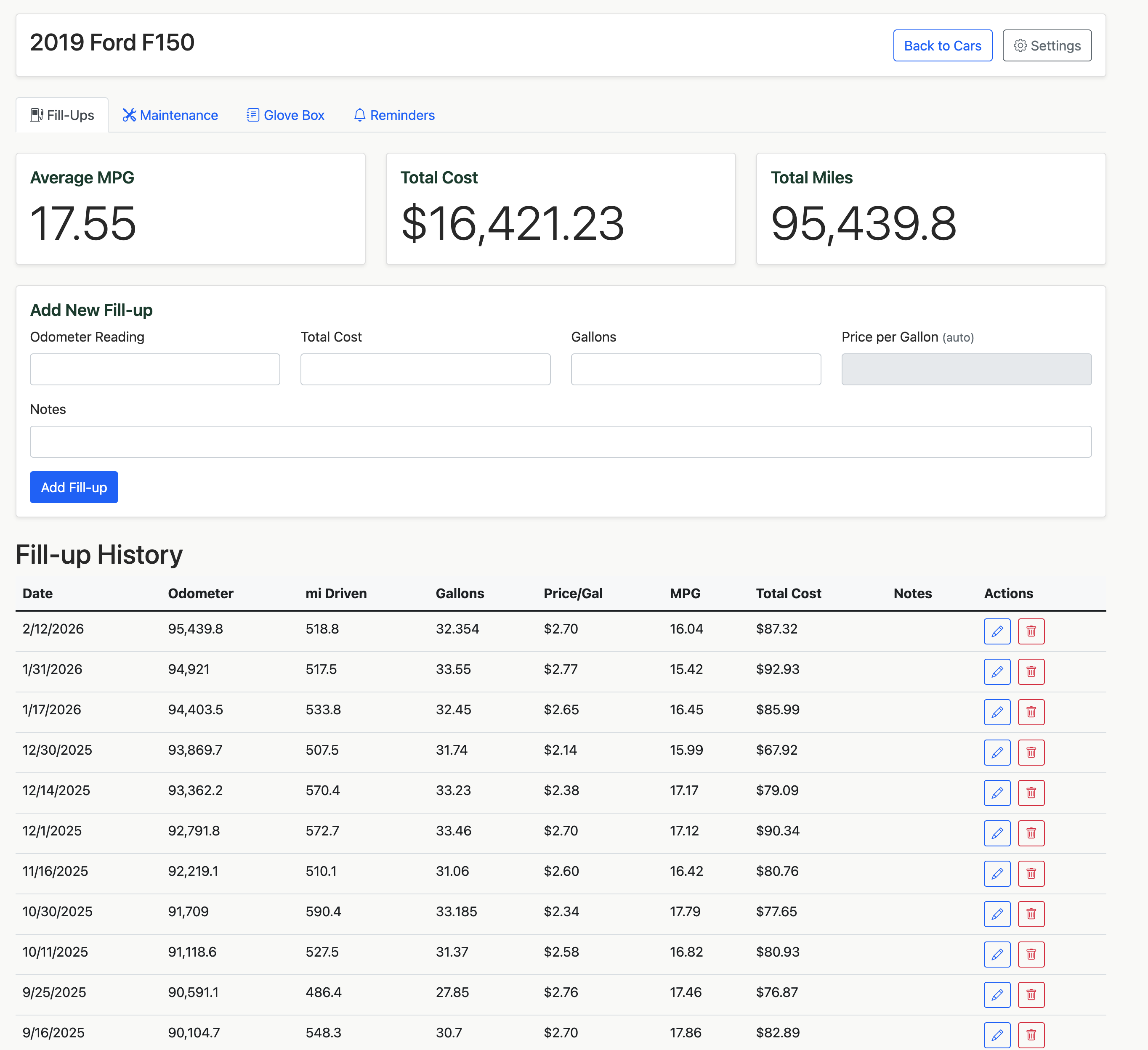
Every vehicle has its own dashboard organized into four tabs. This is where you'll spend most of your time.
Tracking Fuel Economy
Logging a Fill-Up
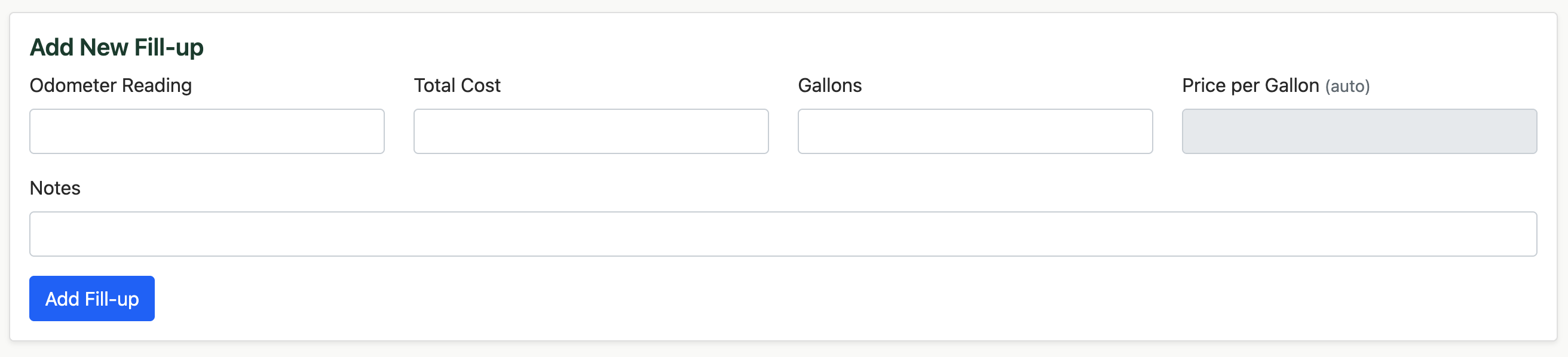
Every time you fill up, open the Fill-Ups tab and enter three numbers: your odometer reading, the total cost, and how many gallons (or liters) you pumped. Wainwright automatically calculates your price per gallon and fuel efficiency.
The stats at the top update in real time — your average MPG, total fuel spending, and total miles driven for that vehicle.
Fuel History
Your complete fill-up history is displayed in a sortable table. Each entry shows the date, odometer, distance driven since the last fill-up, volume purchased, price per unit, calculated efficiency, and total cost. Edit or delete any entry with the action buttons on each row.
Understanding Your Efficiency
Wainwright calculates your fuel efficiency (MPG or km/L) for each fill-up by comparing the distance driven against the fuel purchased. Over time, your average efficiency gives you a clear picture of your vehicle's health — a sudden drop in MPG can be an early warning sign that something needs attention.
Fill-up Charts
The Fill-Ups tab includes a collapsible Charts section that shows your MPG trend and cost per fill-up as visual charts. Expand it by clicking the Charts card header. These charts update in real time as you add fill-ups and are useful for spotting individual fill-up outliers.
Reports
The Reports page (accessible from the top navigation) gives you a broader view of your fuel economy trends over time, aggregated by month rather than by individual fill-up.
Monthly Avg Efficiency
A line chart showing your weighted average MPG (or km/L) for each calendar month. This smooths out the noise of individual fill-ups and makes seasonal patterns easy to spot — most vehicles show lower efficiency in winter months due to cold engine warm-ups and heating loads.
Monthly Fuel Spend
A bar chart of your total fuel cost per month. Useful for budgeting and spotting months when you drove significantly more or when prices spiked.
Year-over-Year Comparison Premier
Premier subscribers with multiple years of data get an overlay chart comparing efficiency month-by-month across years. This is the most powerful view for understanding long-term trends — whether your vehicle is aging, whether a maintenance job improved performance, or whether your driving patterns have changed.
Data Range
Free accounts see reports for the last 3 months. Premier accounts see the full history from your very first fill-up. If you have multiple vehicles, use the vehicle selector at the top of the Reports page to switch between them.
Maintenance Tracking
Quick vs. Detailed Logging
The Maintenance tab offers two ways to log service:
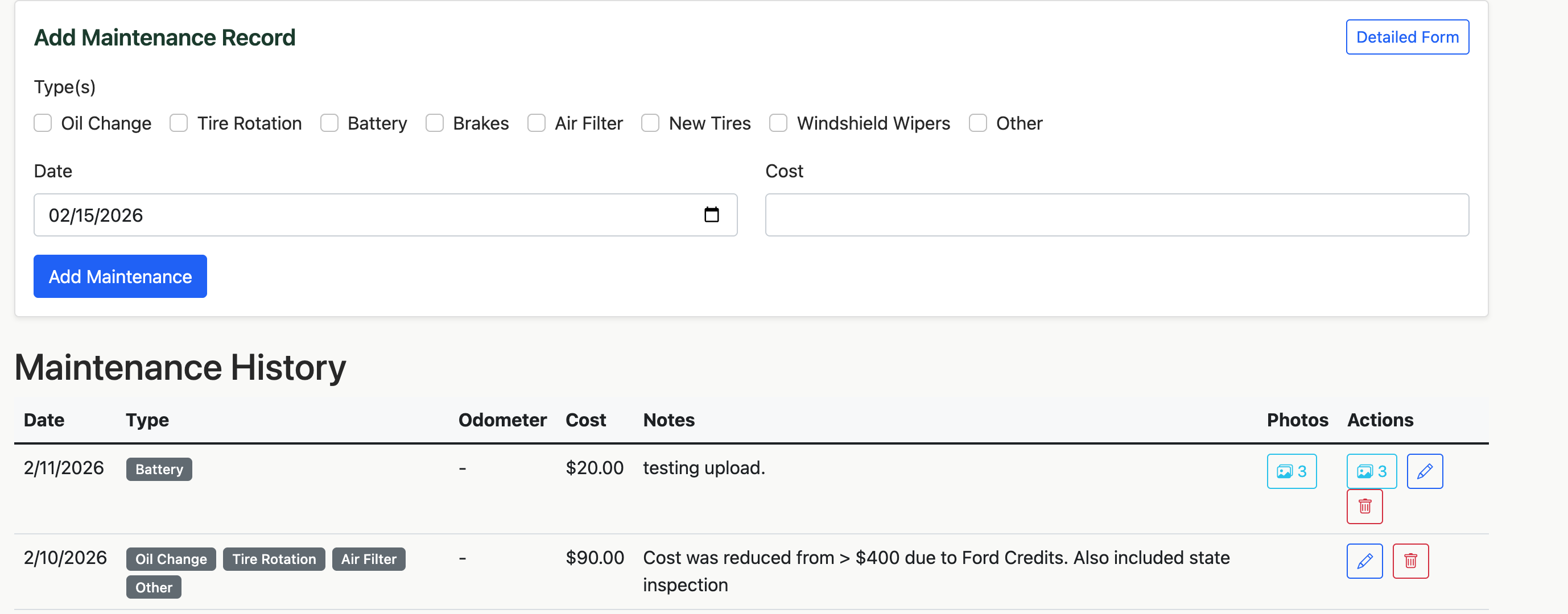
Quick Add — Select one or more maintenance types from the checklist, enter the date and cost, and save. Perfect for a quick oil change entry.
Detailed Form — Toggle to the detailed view when you want to record more: odometer reading, notes about the work done, and up to 5 photos of receipts or the work itself.
Maintenance Types
Wainwright tracks eight common service categories out of the box:
| Type | Common Use |
|---|---|
| Oil Change | Routine oil and filter service |
| Tire Rotation | Rotating tires for even wear |
| Battery | Replacement or testing |
| Brakes | Pads, rotors, fluid |
| Air Filter | Engine or cabin air filter replacement |
| New Tires | Full tire replacement |
| Windshield Wipers | Blade replacement |
| Other | Anything else — catch-all category |
You can select multiple types per record, so if you got an oil change and tire rotation in the same visit, log them together.
Attaching Photos
When using the detailed form, you can attach up to 5 photos per maintenance record. Snap a picture of your receipt, the work being done, or the parts that were replaced. Photos are automatically compressed for storage efficiency and can be viewed later in a gallery carousel.
Maintenance History
Your maintenance history shows every service record with type badges, date, odometer, cost, and notes. Filter and review your complete service history to spot patterns, track spending, or prepare for selling your vehicle.
The Digital Glove Box
Think of the Glove Box as a secure digital folder for every important document related to your vehicle and your driving life. Instead of shuffling through a stack of papers in your actual glove compartment, everything lives here — organized, searchable, and accessible from anywhere.
Document Categories
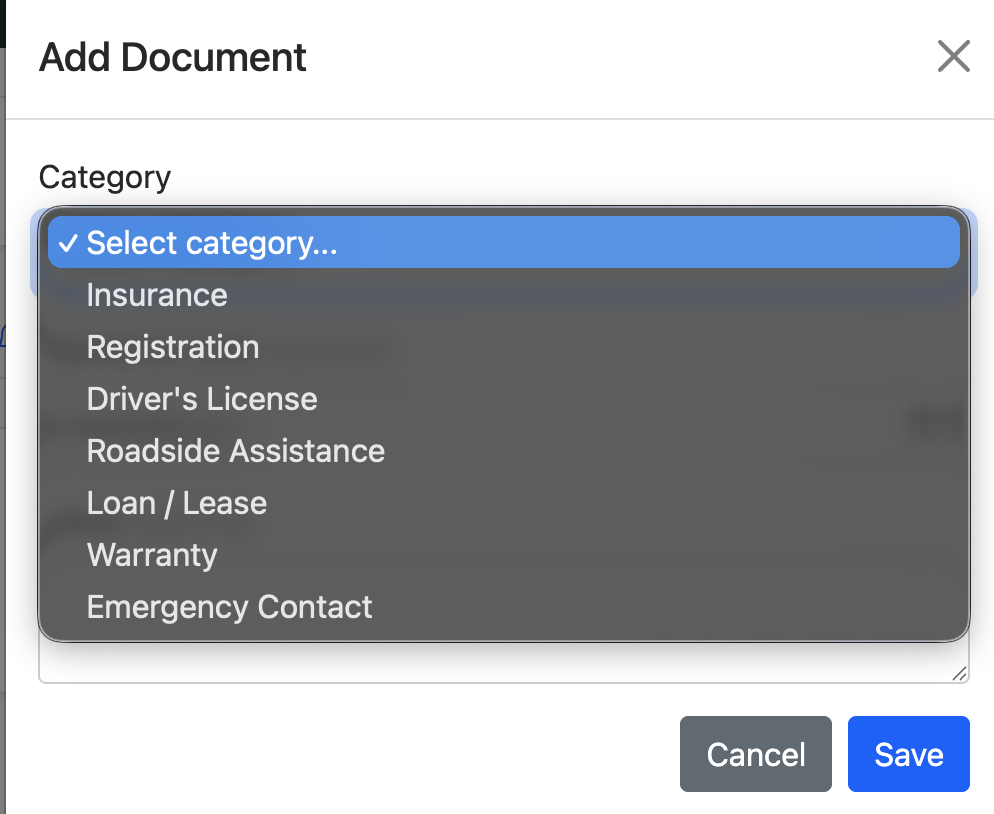
Wainwright organizes your documents into seven categories, each with fields tailored to that document type:
Insurance — Store your carrier name, policy number, coverage type, agent phone number, and premium amount. Know exactly who to call when you need to file a claim.
Registration — Record your state, plate number, and VIN. Never scramble to find your registration details again.
Driver's License — Keep your license number, state, and class on file. Helpful when filling out forms or rental agreements.
Roadside Assistance — Store your provider (AAA, manufacturer program, etc.), member number, and phone number. When you're on the side of the road, you'll be glad this is one tap away.
Loan or Lease — Track your lender, account number, monthly payment, and interest rate. Know your financial picture at a glance.
Warranty — Add multiple warranty entries (bumper-to-bumper, powertrain, extended) with mileage limits and provider details.
Emergency Contacts — Add the people you want contacted in an emergency, with name, phone, and relationship.
Expiration Tracking
Documents with expiration dates get automatic status badges:
- Current — You're good
- Expiring — Within 60 days of expiration
- Expired — Past due, needs attention
Creating Reminders from Documents
The real power of the Glove Box is its connection to the Reminders system. When viewing an expiring document — say your registration or insurance — tap "Create Reminder" and Wainwright pre-fills a reminder with the document's details and expiration date. No duplicate data entry.
Smart Reminders
Never Miss a Renewal
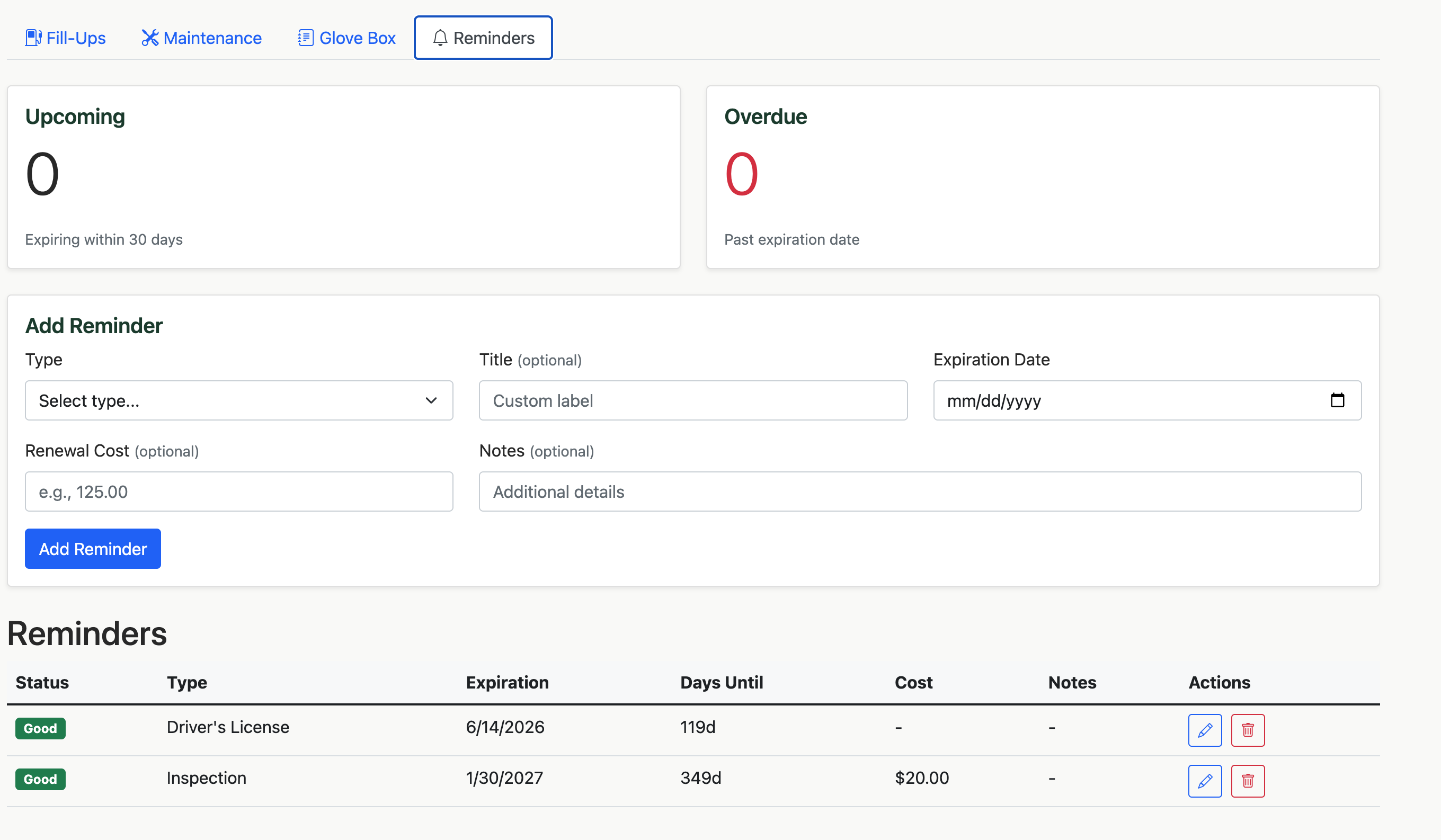
The Reminders tab tracks upcoming expirations and deadlines. Add reminders for registration renewals, state inspections, emissions tests, insurance policy renewals, warranty expirations, lease end dates, and more.
Reminder Types
| Type | Common Use |
|---|---|
| Registration | Annual vehicle registration renewal |
| Inspection | State safety inspection |
| Emissions | Emissions testing deadline |
| Insurance | Policy renewal date |
| Warranty | Warranty expiration tracking |
| Driver's License | License renewal |
| Lease | Lease end date |
| Roadside Assistance | Membership renewal |
| Other | Custom reminders |
Status at a Glance
Every reminder shows a clear status badge and a countdown:
- Good — More than 60 days out
- Upcoming — Within 60 days
- Expired — Past due
The overview cards at the top tell you how many reminders are upcoming and how many are overdue. When you open the dashboard, Wainwright automatically alerts you if anything needs attention.
Exporting Your Data
Vehicle-Level Exports
From Car Settings, export your fill-up history, maintenance history, or both as CSV files. These are standard spreadsheet-compatible files you can open in any spreadsheet application for further analysis, tax preparation, or sharing with a mechanic.
Full Account Export
From your Profile page, export your entire Wainwright dataset as a JSON file. This includes your profile, all vehicles, fill-ups, maintenance records, reminders, and glove box documents. Your data is always yours.
Privacy and Security
Security Is a Priority
Wainwright stores sensitive vehicle and document information, and we take that responsibility seriously. Here's what's in place to protect your data:
- Your data is isolated to your account. Database access rules are enforced at the server level — not just the app. Another user cannot access your records even if they tried to bypass the interface.
- All data is encrypted in transit. Every request between your device and our servers uses HTTPS.
- Bot and abuse protection. Wainwright uses Firebase App Check with Google reCAPTCHA v3 to verify that requests come from a legitimate browser session, blocking automated scripts and API abuse.
- Infrastructure you can trust. All data is stored on Google Firebase — the same infrastructure used by major apps worldwide — with Google's security and compliance standards applied.
- No data selling, ever. Your vehicle records, document details, and account information are never sold or shared with third parties beyond the infrastructure required to run the service.
For full details on what we collect, how it's stored, and your rights, see our Privacy Policy.
A Note on Glove Box Data
The Glove Box stores sensitive information — insurance policy numbers, driver's license details, loan account numbers. This data is stored in your account in Google Firebase and is only accessible to you through the app. Stymie Labs has administrative access to the database as described in our Privacy Policy, but does not actively access individual user records.
Your Data, Your Control
Data Export — Download your fill-up and maintenance history at any time from Car Settings (see Exporting Your Data above).
Account Deletion — To permanently delete your account and all associated data — vehicles, fill-ups, maintenance records, photos, reminders, and glove box documents — use the contact form. We'll complete the deletion within 30 days. This action cannot be undone.
Tips and Best Practices
Get the Most Out of Fuel Tracking
Log every fill-up for the most accurate efficiency data. Wainwright calculates MPG based on the distance between fill-ups, so gaps in your logging will skew the numbers. If you notice a sudden drop in efficiency, it might be time for an air filter change or a tire pressure check.
Stay Ahead of Maintenance
Don't wait until something breaks. Use reminders to schedule routine services based on your driving habits. Oil changes every 5,000 miles, tire rotations every 6,000, and brake inspections every 30,000 are good starting points — but always check your owner's manual for manufacturer recommendations.
Make the Glove Box Work for You
The next time you renew your insurance or registration, take two minutes to update your Glove Box entry and create a reminder for the next renewal. Future you will appreciate it — especially when you're at the DMV and need your policy number.
Preparing to Sell Your Vehicle
Your Wainwright history is a selling point. Export your complete maintenance and fuel history as a CSV, or walk a potential buyer through your records in the app. A well-documented service history can increase your vehicle's resale value.
Frequently Asked Questions
Can I track multiple vehicles?
Yes. Wainwright supports multiple vehicles on a single account. Each vehicle has its own dashboard, history, glove box, and reminders.
What units does Wainwright support?
Imperial (miles, gallons, MPG) and Metric (kilometers, liters, km/L). Set your preference in Profile settings and everything adjusts automatically.
What currencies are supported?
USD, CAD, EUR, and GBP. Select yours in Profile settings.
Are my photos stored securely?
Yes. Photos are stored in secure cloud storage tied to your account. Only you can access your uploaded images.
Can I use Wainwright offline?
Wainwright works best with an internet connection, but basic functionality is available through progressive web app caching.
How do I get Wainwright on my phone?
Visit wainwright.app in your mobile browser and use your browser's "Add to Home Screen" option to install it as a progressive web app (PWA). It works just like a native app.
Need Help?
If you have questions or run into issues, use the contact form. We'd love to hear from you.
Wainwright is built by Stymie Labs, LLC in the Shenandoah Valley of Virginia.